Top 10 Jobber Alternatives for HVAC Software in 2026
The 10 best Jobber alternatives for HVAC contractors in 2026, with real pricing, pros and cons, and free options that skip Jobber's add-on fees.
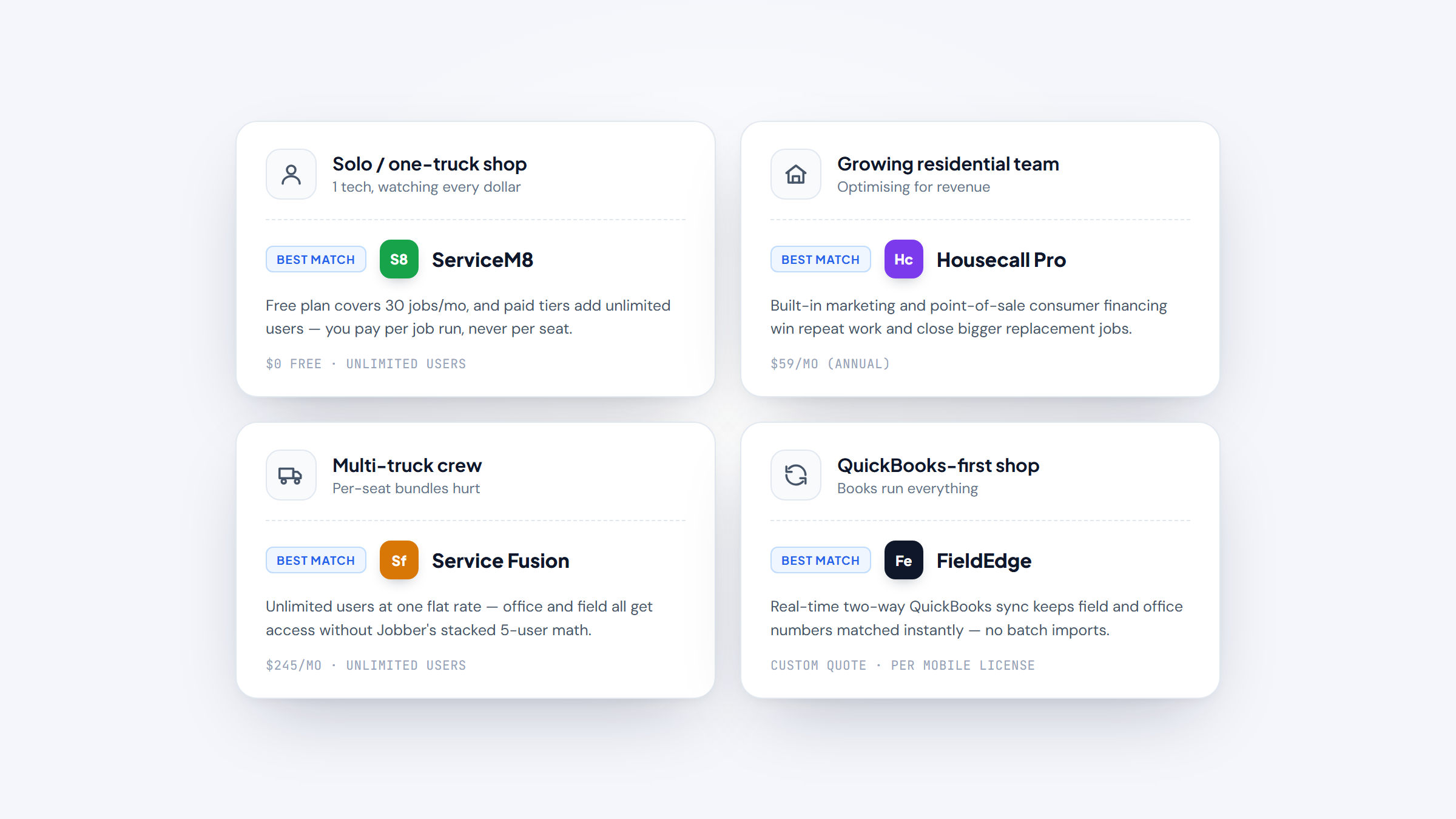
Jobber is one of the most popular field-service tools for HVAC owner-operators, so most Jobber alternatives get measured against it. It runs scheduling, quoting, invoicing, and payments in a clean app that a one-truck shop can set up in an afternoon. The trouble starts as you grow. Features you expect at the base price get gated to higher tiers, and the extras that make the software genuinely useful arrive as paid add-ons that quietly push your monthly bill up.
This guide covers 10 alternatives to Jobber for HVAC contractors, from $0 free tools to commercial platforms that dispatch 50 techs. Each of these Jobber competitors lists real pricing pulled from the vendor's own page, what the tool does best, and where it falls short, so you can find the competitor to Jobber that fits your shop instead of paying for tiers you'll never use.
Why Look for Jobber Alternatives?
Jobber works well for a solo tech or a two-person crew running straightforward residential service. The reasons contractors start shopping usually come down to money and missing features, not a broken product.
The first is add-on cost creep. Jobber Core's headline "$29/mo" is the discounted annual rate; pay monthly and Core is $49. From there, two-way texting, time tracking, and job costing don't appear until the Grow plan at $199 per month ($149 annual). Marketing Suite, the AI Receptionist, and the Pipeline CRM tools are separate paid add-ons on top of whatever tier you're on. One contractor on Jobber's Grow plan wrote on Reddit that reviews cost an extra $39 per month and referrals another $29 per month, landing him near $267 per month for what he called basic stuff any CRM should include.
The second is how the price reads. A five-person roofing owner noted on Reddit that Jobber's site shows the prepaid-annual rate as the "per month" price, so the real all-in software spend runs well above the number on the pricing page once add-ons stack. It's an anecdote, but it matches how the tiers actually work.
The third is seat math. Jobber prices in stepped 5-user bundles, so a shop with four techs pays for five whether it needs them or not. Unlimited-user tools change that equation entirely. And the fourth is outgrowing the feature set: once you need real job costing, deeper QuickBooks sync, or commercial maintenance agreements, you hit the ceiling of what an owner-operator tool was built to do. Getting your HVAC pricing right depends on knowing job costs, and that data has to come from somewhere.
The Best Jobber Alternatives for HVAC Contractors
The 10 tools below cover every shop size and budget. The table gives you the fast comparison; the entries under it go deeper on features, real pricing, and the tradeoffs for an HVAC business specifically.
Tool | Best for | Key features | Main limitation | Pricing (from) | Rating |
|---|---|---|---|---|---|
Housecall Pro | Growing residential HVAC teams | Scheduling, marketing tools, consumer financing | Add-ons and per-user fees stack | $59/mo (annual) | ★★★★½ |
FieldPulse | Multi-trade shops scaling up | Job costing, price book, AI dispatch | Quote-only pricing, no public rate | Custom quote | ★★★★½ |
Workiz | Call-heavy service businesses | Built-in phone, dispatch board, automations | Now quote-based, phone system extra | Custom quote | ★★★★½ |
ServiceM8 | Solo operators and small crews | Unlimited users, job-based pricing, checklists | iOS-first, Android app is limited | $0 (free) | ★★★★½ |
Service Fusion | Flat-rate unlimited-user shops | Unlimited users, dispatch, QuickBooks sync | VoIP and GPS are paid add-ons | $245/mo | ★★★★ |
Kickserv | Budget QuickBooks-tied shops | QuickBooks sync, estimates, payments | Fewer field features than rivals | $60/mo | ★★★★ |
Procured | Small HVAC shops watching cost | Flat tiers, scheduling, invoicing | Newer tool, smaller ecosystem | $49/mo | ★★★★½ |
FieldEdge | QuickBooks-heavy service contractors | Real-time QuickBooks sync, price book, dispatch | Quote-only, per-license mobile seats | Custom quote | ★★★★ |
GorillaDesk | Route-based recurring service | Route scheduling, recurring jobs, automations | Pest/lawn heritage, not HVAC-native | $49/mo | ★★★★½ |
ServiceTitan | Large residential HVAC operations | Call booking, dispatch, reporting, financing | Custom quote, steep cost and setup | Custom quote | ★★★★½ |
No single tool wins for everyone here, so read the entries against your own truck count, your QuickBooks setup, and whether you run residential service or commercial contracts.
Housecall Pro

Best for: Growing residential HVAC teams.
Housecall Pro is the alternative most Jobber users test first, because it targets the same residential service crowd with a similar app but a deeper toolkit. Where Jobber gates marketing behind an add-on, Housecall Pro bakes postcards, email campaigns, and review requests into the higher plans.
It leans hard into revenue tools: consumer financing, online booking, and a sales proposal builder that helps techs close bigger replacement jobs on the spot.
Key features:
- Built-in marketing (email, postcards, reviews) → win repeat and referral work without a separate add-on
- Consumer financing at the point of sale → close full system replacements techs would otherwise lose
- Price book and good/better/best estimates → present flat-rate options that lift average ticket
Pricing: Basic runs $59 per month on the annual plan ($79 monthly) for one user, Essentials is $149 per month annual ($189 monthly) for five users, and Max is $299 per month annual for eight users plus $35 per extra user. A 14-day trial needs no card.
Pros: strong marketing and sales tools, large user base and support, deep add-on ecosystem. Cons: costs climb fast with add-ons and extra seats, some features feel bloated for a solo tech, per-user fees on top tiers.
Why it's a good Jobber alternative: Housecall Pro gives a growing residential shop the marketing and financing muscle Jobber charges extra for, in one app your techs already know how to use. It's the natural step up when review-driven HVAC marketing starts driving real revenue.
Final verdict: If you're leaving Jobber because you want built-in marketing and sales tools rather than a pile of add-ons, Housecall Pro is the closest like-for-like upgrade.
FieldPulse

Best for: Multi-trade shops scaling up.
FieldPulse aims squarely at contractors who've outgrown Jobber's feature ceiling. It handles the same scheduling and invoicing, then adds real job costing, a customizable price book, and team-management tools that owner-operator apps skip.
For an HVAC shop that also does a little plumbing or electrical, its multi-trade setup and seat-based access (full-access versus field-only) keep things organized as the crew grows.
Key features:
- Job costing that tracks labor and materials → see which install and service jobs actually make money
- Operator AI for 24/7 dispatch and answering → capture after-hours calls without a live dispatcher
- Full-access versus field-only seats → give techs the app without paying for office features
Pricing: FieldPulse is quote-based, with Essentials, Professional, and Enterprise tiers priced by seat type. Add-ons like Engage VoIP, Operator AI, Payments, and Fleet are quoted separately, so ask for an all-in number before you commit.
Pros: genuine job costing, strong for multi-trade shops, flexible seat pricing. Cons: no public price to compare, add-ons quoted on top, more setup than a plug-and-play app.
Why it's a good Jobber alternative: FieldPulse delivers the job costing and team controls Jobber locks to its top tier, which makes it a strong competitor to Jobber for a shop that's growing past two or three trucks. If FieldPulse is on your list, our FieldPulse alternatives rundown compares it against its own closest rivals.
Final verdict: Choose FieldPulse when you need job costing and multi-trade organization that a pure owner-operator tool can't give you.
Workiz

Best for: Call-heavy service businesses.
Workiz stands out for shops that live and die by the phone. It builds a full phone system into the software, so call recording, tracking, and click-to-dial sit right next to the dispatch board instead of in a separate tool.
That matters for HVAC contractors running paid ads, where you want to know which campaign booked which job. The drag-and-drop schedule board and automation rules round it out for a busy dispatcher.
Key features:
- Built-in phone system with call tracking → tie booked jobs back to the ad or source that drove the call
- Drag-and-drop dispatch board → reassign techs across the day without double-booking a truck
- Automated reminders and follow-ups → cut no-shows and chase unpaid invoices on autopilot
Pricing: Workiz is now quote-based across its Standard, Pro, and Ultimate plans. The first five users are included, with extra members at $55 per month (Standard) or $65 per month (Pro) billed annually, and the Genius Answering phone service is sold separately.
Pros: excellent call and lead tracking, strong scheduling, useful automations. Cons: pricing hidden behind a quote, phone features cost extra, can be more than a small shop needs.
Why it's a good Jobber alternative: For a contractor whose growth depends on HVAC leads from ads, calls, and HVAC SEO, Workiz turns the phone into a tracked, measurable channel that Jobber leaves to third-party tools.
Final verdict: Pick Workiz if inbound calls drive your business and you want lead tracking wired into dispatch.
ServiceM8

Best for: Solo operators and small crews.
ServiceM8 flips the pricing model that frustrates Jobber users. Instead of charging per seat, it charges by jobs per month with unlimited users on every paid plan, so adding a second or third tech costs nothing extra.
That makes it one of the cheapest ways for a small HVAC shop to run scheduling, quoting, and field checklists. The catch is platform: it's iOS-first, and the Android app is a stripped-down "Lite" version.
Key features:
- Unlimited users on every paid plan → add techs without buying seats the way Jobber's bundles force
- Job-based pricing tiers → pay for the volume you run, not the size of your crew
- Digital checklists and forms → standardize PM visits and safety checks in the field
Pricing: A free plan covers 30 jobs per month for one user. Paid plans run Starter at $29 per month (50 jobs), Growing at $79 per month (150 jobs), Premium at $149 per month (500 jobs), and Premium Plus at $349 per month (1,500-plus jobs). All paid tiers include unlimited users.
Pros: unlimited users, genuinely free entry tier, strong field forms. Cons: iOS-first with a limited Android app, job caps rather than flat use, fewer marketing tools.
Why it's a good Jobber alternative: ServiceM8's unlimited-user, job-based pricing beats Jobber's 5-user bundles for any crew where seat count outpaces job volume. See how it stacks up against its peers in our ServiceM8 alternatives guide.
Final verdict: If your crew runs Apple devices and you'd rather pay per job than per seat, ServiceM8 is one of the most cost-effective alternatives to Jobber going.
Service Fusion

Best for: Flat-rate unlimited-user shops.
Service Fusion's whole pitch is unlimited users at a flat monthly rate, which is exactly where Jobber's 5-user bundles get expensive. A shop with eight or ten office and field staff pays the same tier price as one with three.
It's a mature platform with dispatch, estimating, QuickBooks sync, and customer management built for HVAC and other trades, though a couple of the flashier features cost extra.
Key features:
- Unlimited users on every tier → office staff and techs all get access at one flat price
- Two-way QuickBooks integration → cut double entry between the field and your accountant
- Dispatch grid with drag-and-drop → move jobs and techs around a live board
Pricing: Starter is $245 per month ($208 on the annual plan), Plus is $382 per month ($325 annual), and Pro is $627 per month ($533 annual), all with unlimited users. ServiceCall.ai (VoIP) and GPS Fleet Tracking are paid add-ons on every tier, including Pro.
Pros: truly unlimited users, solid QuickBooks sync, no per-seat math. Cons: higher entry price, VoIP and GPS cost extra, interface feels dated to some.
Why it's a good Jobber alternative: Once you pass four or five users, Service Fusion's flat unlimited pricing usually undercuts Jobber's stacked bundles, which is why it's a favorite competitor to Jobber for mid-size shops. Our Service Fusion alternatives piece weighs it against similar unlimited-user tools.
Final verdict: Service Fusion earns its spot for any HVAC business big enough that per-seat pricing has become the enemy.
Kickserv

Best for: Budget QuickBooks-tied small shops.
Kickserv is a straightforward, wallet-friendly option for a small HVAC shop that mainly needs estimates, scheduling, invoicing, and clean QuickBooks sync. It doesn't try to be everything, which keeps the learning curve short.
Its "Kickback" discount rewards higher online-payment volume, so the more you collect through the platform, the less the software costs.
Key features:
- Two-way QuickBooks integration → keep invoices and payments in sync with your books
- Estimates and online payments → send quotes and get paid without a separate tool
- Kickback volume discount → shave the monthly fee as payment volume climbs
Pricing: Start is $60 per month (5 users), Run is $119 per month (10 users), and Scale is $199 per month (20 users), with 20% off annual billing plus an extra 5% Kickback discount at higher payment volume. QuickBooks Desktop integration adds $50 per month on the Run plan.
Pros: affordable entry price, includes multiple users, good QuickBooks link. Cons: fewer field and marketing features, QuickBooks Desktop sync costs extra, less depth for larger crews.
Why it's a good Jobber alternative: Kickserv covers the core Jobber jobs, quoting, scheduling, and invoicing, at a lower entry price with users bundled in, making it a practical alternative to Jobber for cost-conscious shops.
Final verdict: Go with Kickserv if you want the basics done cleanly and tied to QuickBooks without paying for features you won't touch.
Procured

Best for: Small HVAC shops watching cost.
Procured is a newer field-service tool built around simple, published pricing, the opposite of Jobber's gated tiers and quote-only add-ons. Its plans state what you pay and how many users you get up front.
For a small residential shop, it handles scheduling, invoicing, and customer records without the add-on surprises that push Jobber's real cost above its headline rate.
Key features:
- Flat published tiers → know your monthly cost without decoding add-ons
- Scheduling and invoicing in one app → run the day-to-day without stitching tools together
- Included user counts per plan → bring on staff without per-seat penalties at low tiers
Pricing: Solo is $49 per month for one user, Team is $75 per month for up to five users, and Business is $145 per month for 15 users, then $9 per user per month (or $90 per user per year on annual billing). A 14-day Business trial needs no card, and Stripe processing fees apply separately.
Pros: transparent pricing, low entry cost, users included per tier. Cons: newer product with a smaller ecosystem, fewer integrations than veterans, less proven at scale.
Why it's a good Jobber alternative: Procured's flat, published pricing answers the exact complaint that sends people looking past Jobber, add-on cost creep, which makes it a clean alternative to Jobber for a budget-minded shop.
Final verdict: Procured suits a small HVAC business that wants predictable monthly cost and the core scheduling-to-invoice workflow without tier games.
FieldEdge

Best for: QuickBooks-heavy service contractors.
FieldEdge is built for HVAC and mechanical contractors who run their books tightly in QuickBooks. Its signature is a deep, real-time two-way sync that keeps invoices, payments, and customers matched between field and office without batch imports.
It also carries a strong price book and service-agreement tools, which matter for shops selling maintenance plans rather than only one-off repairs.
Key features:
- Real-time two-way QuickBooks sync → office and field see the same numbers instantly
- Price book with flat-rate options → present good/better/best pricing at the door
- Service agreement management → track and renew PM contracts automatically
Pricing: FieldEdge is quote-based across its Select, Premier, and Elite tiers, which show a feature table but no public rate. Mobile licenses come in counts of 2, 4, or 6 by tier, and extras like Proposal Pro and MarketingEdge are "call for pricing," so get a full quote.
Pros: best-in-class QuickBooks sync, strong for service agreements, solid price book. Cons: no published pricing, mobile seats are limited per tier, add-ons quoted separately.
Why it's a good Jobber alternative: For a contractor whose accounting lives in QuickBooks, FieldEdge's real-time sync solves the double-entry pain that Jobber's lighter integration leaves on the table.
Final verdict: FieldEdge is the pick when tight QuickBooks accounting and maintenance-agreement tracking outrank a low sticker price.
GorillaDesk

Best for: Route-based recurring service.
GorillaDesk comes from the pest, lawn, and pool world, so it's built around routes and recurring visits. That heritage suits HVAC shops with heavy preventive-maintenance schedules and repeat stops, where route efficiency drives the day.
It's not HVAC-native, so you'll adapt some terminology, but the recurring-job automation and route scheduling are genuinely strong for maintenance-heavy operations.
Key features:
- Route-based scheduling → sequence a day of PM stops to cut drive time
- Recurring job automation → auto-generate repeat maintenance visits and invoices
- Automated reminders and follow-ups → keep customers on their service schedule
Pricing: Basic is $49 per month ($539 per year), Pro is $99 per month ($1,089 per year), and Growth is $149 per month ($1,639 per year). An SMS add-on runs $5 per month per number plus message credits, with no setup fees, no contracts, and free migration.
Pros: excellent for recurring routes, no contracts, free migration help. Cons: not HVAC-native, some terminology to adapt, SMS costs extra.
Why it's a good Jobber alternative: If preventive maintenance and recurring routes are your bread and butter, GorillaDesk's route tools outclass Jobber's simpler scheduling for that specific job.
Final verdict: Choose GorillaDesk when repeat maintenance routes, not one-off installs, are the heart of your business.
ServiceTitan

Best for: Large residential HVAC operations.
ServiceTitan sits at the opposite end of the market from Jobber. It's an enterprise platform for large residential HVAC operations that book heavy call volume and want deep reporting, call-center tools, and financing built in.
The power comes with a real price and a longer rollout, so it's overkill for a one-truck shop but a genuine ceiling-raiser for a growing multi-crew business.
Key features:
- Call booking and dispatch tools → route high call volume to the right techs efficiently
- Deep reporting and dashboards → see revenue, close rates, and tech performance by the number
- Built-in consumer financing → close large system replacements without a third-party lender
Pricing: ServiceTitan is fully custom and quote-based, priced per technician across its Starter, Essentials, and The Works packages, all "request pricing." A widely cited "$3,500 to $4,000 per month for 10 techs" is a third-party contractor estimate, not a ServiceTitan-published rate, so treat it as a ballpark only.
Pros: enterprise-grade reporting, strong call-center and financing tools, deep feature set. Cons: high cost, longer setup, more than a small shop can use.
Why it's a good Jobber alternative: When a shop outgrows Jobber's owner-operator ceiling and needs call-center-grade dispatch and reporting, ServiceTitan is the enterprise answer, and worth comparing carefully before you commit.
Final verdict: ServiceTitan makes sense only once you're big enough that its reporting and call-handling pay for the premium.
How Much Do Jobber Alternatives Cost?
Pricing across these tools splits into two camps. Some publish flat rates you can compare in a minute; others hide behind a "request a quote" form, usually because they price per technician or bundle add-ons per shop. The table below lines up the cheapest published entry point for each so you can see the spread.
Tool | Entry price | Billing basis | Free trial |
|---|---|---|---|
ServiceM8 | $0 (free) | Per jobs/month, unlimited users | Free plan (30 jobs/mo) |
Procured | $49/mo | Per plan, users included | 14-day (Business) |
GorillaDesk | $49/mo | Per plan | Yes |
Housecall Pro | $59/mo (annual) | Per plan + per-user on top tiers | 14-day |
Kickserv | $60/mo | Per plan, users bundled | Yes |
Service Fusion | $245/mo | Flat, unlimited users | Demo |
FieldPulse | Custom quote | Per seat (full vs field-only) | Demo |
Workiz | Custom quote | Per plan, 5 users included | Demo |
FieldEdge | Custom quote | Per mobile license | Demo |
ServiceTitan | Custom quote | Per technician | Demo |
The pattern is clear once you map it to shop size. The SBA Office of Advocacy reports that 82.3% of U.S. small businesses, about 29.8 million of them, are nonemployer or solo firms, and only 17.7% have employees at all. That's the Jobber-and-below crowd: solo techs and tiny crews who fit a $0 to $60 flat-rate tool. The unlimited-user and quote-based platforms only start paying off once you're staffing an office and running multiple trucks.
How Hard Is It to Migrate From Jobber?
Switching software feels risky mostly because your customer history lives inside the old tool. The good news is that the move is mechanical, not magical, and most alternatives will help. Here's the order that keeps a live shop from missing a beat.
- Export your Jobber data first: customers, properties, quotes, and open jobs usually come out as CSV files from your account settings.
- Ask the new vendor about migration help. GorillaDesk and others offer free migration, and most will import your customer list for you.
- Rebuild your price book and flat-rate items in the new tool before go-live, so techs quote correctly from day one.
- Reconnect QuickBooks and run one test invoice end to end before you trust the sync with real money.
- Run both systems in parallel for a week, closing new jobs in the new tool while you confirm nothing dropped.
Plan the switch for your slow season, not the July heat wave. A weekend rollout with a test week after it beats a rushed cutover mid-rush, and it gives your techs time to learn the app before the phones blow up. Budget a few days of lower productivity while everyone adjusts, and the migration itself rarely takes more than a week or two of part-time work.
How to Choose the Right Jobber Alternative for Your Needs
The right pick comes down to three questions: how many people touch the software, how tied you are to QuickBooks, and whether you run residential service or commercial contracts. Match those to the list and the field narrows fast.
For a solo tech or two-person crew, start with ServiceM8's free tier or Procured's $49 flat plan; you get the core workflow without seat penalties. For a growing residential shop of four to ten, Service Fusion's unlimited-user pricing or Housecall Pro's marketing tools usually win, depending on whether you optimize for cost or for revenue. Shops that live in QuickBooks should shortlist FieldEdge or Kickserv for the sync. And a large operation booking heavy call volume is the one case where ServiceTitan's price tag can pencil out.
Software choice isn't a small decision, either. The U.S. Census Bureau's 2023 Annual Business Survey found that 58.9% of businesses call specialized software "very important" to their processes, tied with cloud services as the top category. For a service business, the field-service tool is core infrastructure, so weigh the fit against your workflow, not just the sticker price. A tool that dispatches cleanly and syncs your books is worth more than a cheaper one your techs fight every day.
One more filter: don't over-buy. A common mistake is jumping from Jobber straight to an enterprise platform because it looks powerful, then paying for reporting and call-center features a five-truck shop never touches. Buy for the shop you'll run in the next year, not the one in your five-year plan.
Picking Your Next Field-Service Tool
Jobber is a fine starting point, and plenty of one-truck shops never need to leave it. The moment you feel the add-on creep, the 5-user bundle math, or a feature ceiling on job costing and QuickBooks, one of these 10 tools fits better for less friction.
Anchor your decision on crew size and workflow. Solo and tiny crews should look at ServiceM8 and Procured for flat, low pricing. Growing residential shops get the most from Service Fusion's unlimited users or Housecall Pro's revenue tools. QuickBooks-heavy contractors want FieldEdge or Kickserv, and only genuinely large operations should carry ServiceTitan's cost. Whatever you shortlist, run the free trial with real jobs before you migrate, and time the switch to your slow season. Getting the tool right is part of a bigger picture, so it's worth building a proper HVAC marketing plan around the shop you're trying to grow into.
Frequently asked questions
For a solo tech or a small crew, ServiceM8 and Procured are the strongest picks. ServiceM8 has a genuinely free tier (30 jobs per month) and unlimited users on paid plans starting at $29 per month, so seat count never costs extra. Procured runs $49 per month for one user with published, add-on-free pricing. Both avoid the tier-gating and paid add-ons that make Jobber's real cost climb.

Still comparing HVAC software?
Filter 159 vetted tools by pricing, business size, and the features your shop actually needs. No signup, no sales calls.