Top 10 Service Fusion Alternatives for HVAC in 2026 You Can Trust
The 10 best Service Fusion alternatives for HVAC in 2026, with verified pricing, pros and cons, and which shops should keep the flat-rate plan.
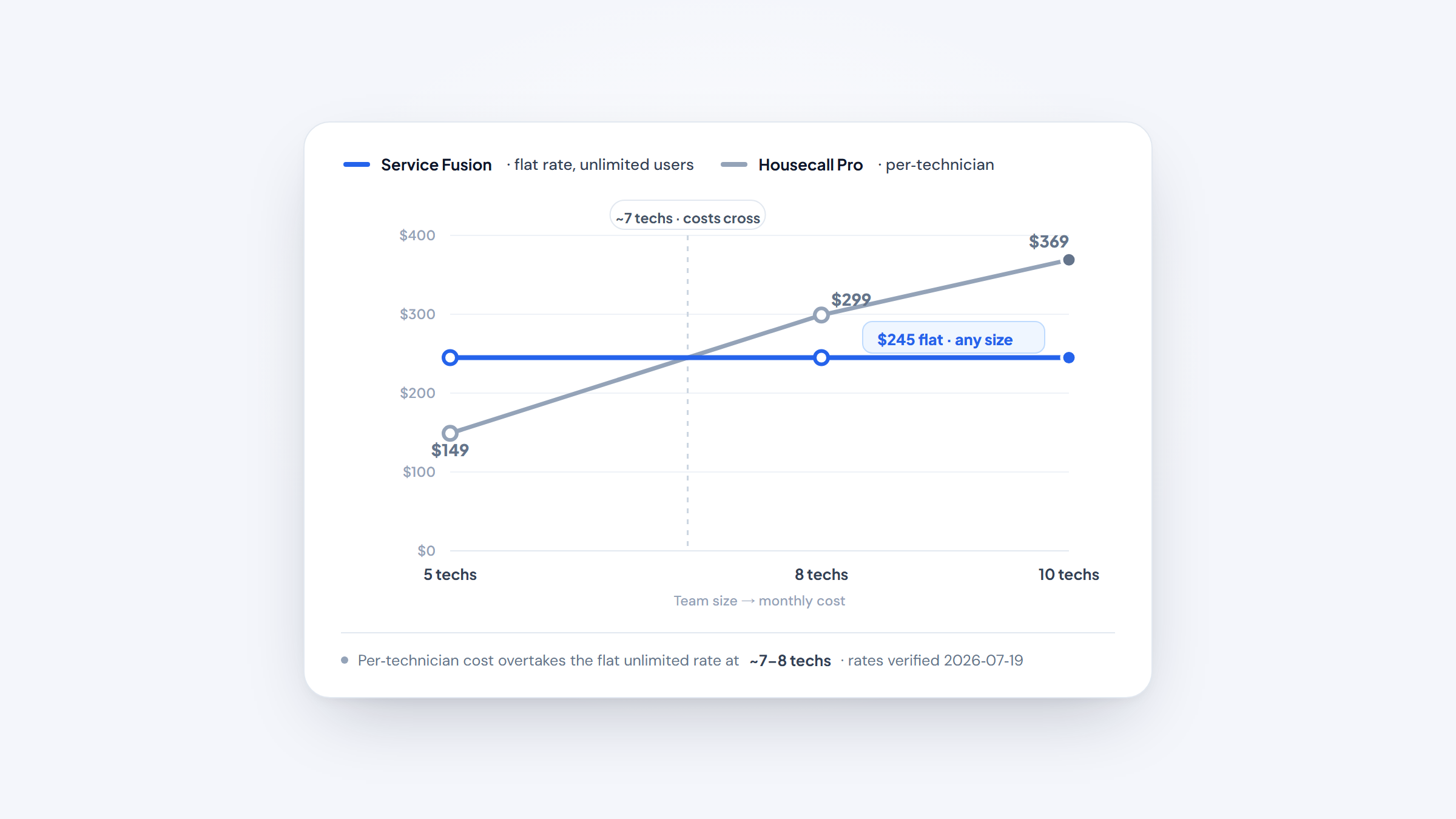
If you're weighing Service Fusion alternatives, start by being honest about why. Service Fusion suits established residential and light-commercial shops that want one flat monthly bill covering unlimited office staff and techs, no per-seat math. That pricing model is its real strength. Contractors look past it for two reasons that show up again and again: a mobile app that struggles in the field, and reporting that can't drive marketing or win-back campaigns.
This guide covers the 10 best alternatives to Service Fusion for HVAC, with verified pricing, real pros and cons, and a screenshot of each. These Service Fusion competitors range from lean solo apps to commercial platforms, and the guide also flags the shops that shouldn't switch at all, because for big teams the flat rate is worth keeping.
Why Look for Service Fusion Alternatives?
Service Fusion does the core office work well: scheduling, dispatch, estimates, invoicing, and QuickBooks sync. The friction is in the field and in the data.
The mobile app is the loudest complaint. On a Reddit thread, a current user described text formatting collapsing when a job note is edited on the phone, nearly every action needing a live server round-trip (rough in a spotty crawlspace), and finalized invoices that can't be undone from the app. Their summary: "the app itself is kind of trash," and most of the value sits office-side. Treat that as one shop's experience, but it matches the pattern in many reviews.
Weak reporting is the second gap. A shop running 10 techs on Service Fusion since 2016 said on another Reddit thread that the database filtering and reports were too thin to run win-back marketing campaigns. Service Fusion has no native lead-gen or marketing suite, so if you want to pull "customers with a 12-year-old system, no PM agreement" and text them, you're exporting to a spreadsheet. If growth depends on marketing, pair any tool with a real HVAC marketing plan.
A third reason is fit at the extremes. Solo operators can find the $245 per month Starter tier steep for one truck, while large commercial mechanical contractors often want project management, service agreements, and asset tracking that Service Fusion handles only lightly.
The Best Service Fusion Alternatives
Here's how the 10 alternatives compare at a glance. Pricing is the lowest verified public rate as of 2026-07-19; "Custom" means the vendor publishes no dollar figure and quotes by phone.
Tool | Best for | Key features | Main limitation | Pricing (from) | Rating |
|---|---|---|---|---|---|
Housecall Pro | Residential HVAC growth | Scheduling, payments, price book | Per-user costs add up | $59/mo (annual) | ★★★★½ |
Jobber | Small home-service shops | Quoting, scheduling, client hub | Features gate to top tier | $29/mo (annual) | ★★★★½ |
FieldEdge | QuickBooks-first shops | Real-time QuickBooks sync, dispatch | No public pricing | Custom | ★★★★ |
FieldPulse | Growing multi-trade teams | Job costing, AI dispatch, VoIP | Quote-only, seat-based | Custom | ★★★★½ |
ServiceTitan | Large residential operations | Marketing, call booking, reporting | Enterprise pricing and setup | Custom | ★★★★½ |
Workiz | Dispatch-heavy service shops | Scheduling, built-in phone, jobs | Add-ons priced separately | Custom | ★★★★½ |
Procured | Budget-minded HVAC owners | Scheduling, invoicing, flat plans | Newer, smaller ecosystem | $49/mo | ★★★★½ |
Kickserv | QuickBooks-tied small shops | Estimates, scheduling, payments | Fewer HVAC-specific tools | $60/mo | ★★★★ |
BuildOps | Commercial mechanical crews | Service agreements, asset tracking | Built for large teams | Custom | ★★★★½ |
Simpro | Complex commercial projects | Project management, inventory, forms | Steep learning curve | Custom | ★★★★ |
Each entry below covers who it fits, the real pricing, and where it beats or trails Service Fusion. Start with the tools closest to your shop size.
Housecall Pro

Best for: Growing residential HVAC shops.
Housecall Pro is the tool most Service Fusion refugees test first, and for good reason: its mobile app is the opposite of Service Fusion's weak point. Techs quote, collect payment, and update jobs on the phone without an office round-trip.
Where Service Fusion has no marketing, Housecall Pro bakes in postcards, email, and review requests. That makes it a natural fit if your growth runs on repeat customers.
Key features:
- Mobile app for estimates and card payments in the driveway, so techs close jobs on-site.
- Built-in price book and good-better-best estimates that lift average ticket without manual math.
- Automated review requests and email campaigns that turn past jobs into repeat calls.
Pricing: Plans start at $59 per month (billed annually, one user) for Basic, $149 per month for Essentials (5 users), and $299 per month for Max (8 users, then $35 per extra user). A 14-day free trial needs no card, and card processing starts at 2.59%.
Pros: Strong mobile app, real marketing tools, easy for techs to learn. Cons: Per-user pricing adds up, top features sit on higher tiers, weaker on commercial jobs.
Why it's a good Service Fusion alternative: It fixes the exact field and marketing gaps that push residential shops off Service Fusion, without a heavy setup. Housecall Pro is one of the strongest Service Fusion alternatives for owner-operated home-service teams.
Final verdict: If your shop is residential and under about 8 techs, Housecall Pro is the safest first switch to trial.
Jobber

Best for: Small home-service teams.
Jobber leans clean and simple where Service Fusion feels dense. Quoting, scheduling, and invoicing sit behind a tidy interface, and the client hub lets customers approve quotes and pay online.
It's aimed at smaller shops, so a two-to-eight-tech HVAC operation gets running fast without a long onboarding.
Key features:
- Drag-and-drop scheduling with a client self-service hub, cutting the back-and-forth phone tag.
- Online quote approval and automatic follow-ups that shorten the time from estimate to booked job.
- Job-costing and two-way texting on higher tiers, so you see margin per job.
Pricing: Core runs $49 per month ($29 billed annually) for one user, Connect $139 per month ($99 annual), and Grow $199 per month ($149 annual), priced in stepped 5-user bundles with custom pricing above 15 users. Two-way texting, time tracking, and job costing unlock on Grow and up.
Pros: Simple to learn, sharp customer experience, low entry price. Cons: Best features gate to Grow, add-ons cost extra, thin on commercial and PM work.
Why it's a good Service Fusion alternative: It trades Service Fusion's flat unlimited model for a cleaner, cheaper starting point that small residential shops actually enjoy using. If you want the tidy end of the market, compare it against other Jobber alternatives too.
Final verdict: Pick Jobber if you're a lean residential crew that values simplicity over deep field service depth.
FieldEdge

Best for: QuickBooks-dependent HVAC shops.
FieldEdge earns its place on the strength of one thing Service Fusion users constantly wrestle with: accounting. Its real-time, two-way QuickBooks sync means an invoice raised in the field lands in your books without re-entry.
For an established shop where the bookkeeper and the dispatcher are fighting over data, that sync alone can justify the switch.
Key features:
- Two-way real-time QuickBooks sync that ends double data entry between field and office.
- Dispatch board with technician tracking, so you see who's free before you promise a window.
- Service agreement management that keeps PM renewals from slipping through the cracks.
Pricing: FieldEdge is quote-based across its Select, Premier, and Elite tiers, priced per technician with mobile licenses tied to each tier. A commonly cited "$150 to $300+ per user per month plus setup" is a third-party estimate, not a published rate, so get a live quote.
Pros: Best-in-class QuickBooks sync, solid dispatch, strong service agreements. Cons: No public pricing, per-technician cost, dated interface in spots.
Why it's a good Service Fusion alternative: It targets the accounting friction Service Fusion shops feel while keeping the same established-shop focus. FieldEdge is a good Service Fusion alternative when your books are the bottleneck.
Final verdict: Choose FieldEdge if tight QuickBooks integration matters more to you than a published price.
FieldPulse

Best for: Growing multi-trade field teams.
FieldPulse has climbed fast by covering the operational depth Service Fusion offers while adding modern extras. Job costing, a strong mobile app, and AI dispatch put it ahead where Service Fusion's app falls down.
It suits shops that run HVAC alongside plumbing or electrical and want one system for all of it.
Key features:
- Detailed job costing that shows real margin per job, not just revenue.
- Operator AI for 24/7 dispatch handling, so after-hours calls don't go to voicemail.
- Engage VoIP and payments built in, keeping calls, texts, and money in one place.
Pricing: FieldPulse is quote-based across Essentials, Professional, and Enterprise, priced by seat (full-access versus field-only). Add-ons like Engage VoIP, Operator AI, and Payments are quoted separately, so any flat "$99 per month" from old reviews is out of date.
Pros: Deep job costing, modern mobile app, broad add-ons. Cons: Quote-only pricing, seat-based costs scale, more features than a solo shop needs.
Why it's a good Service Fusion alternative: It matches Service Fusion's back-office depth but fixes the mobile weakness and adds AI dispatch. See how it stacks against other FieldPulse alternatives before you commit.
Final verdict: FieldPulse fits a growing multi-trade shop that wants depth without Service Fusion's field-app headaches.
ServiceTitan

Best for: Large residential HVAC operations.
ServiceTitan is the enterprise answer to everything Service Fusion does lightly. Its reporting, call booking, and marketing tools are the deepest on this list, which directly addresses the win-back-campaign gap that frustrates Service Fusion users.
The tradeoff is cost and complexity. This is a platform for shops ready to invest in a full operating system, not a quick swap.
Key features:
- Marketing and call-tracking tools that tie ad spend to booked revenue, so you know what your HVAC leads actually cost.
- Deep reporting and dashboards that surface job profitability the way Service Fusion can't.
- Membership and service agreement management built for high recurring revenue.
Pricing: ServiceTitan is fully custom and quote-based, priced per technician across its Starter, Essentials, and The Works packages. A widely cited "$3,500 to $4,000 per month for 10 techs" is a third-party contractor estimate, not a ServiceTitan rate, so budget for enterprise-level cost.
Pros: Deepest reporting and marketing, strong for scale, high revenue focus. Cons: Expensive, long setup, overkill for small shops.
Why it's a good Service Fusion alternative: It's the upgrade path when Service Fusion's thin reporting caps your growth. If the price gives you pause, weigh the cheaper ServiceTitan alternatives first.
Final verdict: Go with ServiceTitan only if you're a large residential shop ready to run on data and can absorb the cost.
Workiz

Best for: Dispatch-heavy service shops.
Workiz is built around the phone and the dispatch board, which is where a busy HVAC office lives. Calls, jobs, and scheduling connect in one flow, so a booked call becomes a scheduled truck roll without retyping.
For shops that run high call volume, that phone-to-job link is a real edge over Service Fusion's more static dispatch.
Key features:
- Built-in phone system that logs calls against customer records, so nothing gets lost.
- Drag-and-drop dispatch with live status, keeping the board accurate through a chaotic day.
- Automated job reminders that cut no-shows and last-minute reschedules.
Pricing: Workiz is now quote-based across Standard, Pro, and Ultimate. The first 5 users are included, with extra members at $55 per month (Standard) or $65 per month (Pro), billed annually. Its Genius Answering phone service is sold separately.
Pros: Strong built-in phone tools, good dispatch, easy scheduling. Cons: Add-ons priced separately, quote-only tiers, fewer commercial features.
Why it's a good Service Fusion alternative: It sharpens the call-to-dispatch workflow Service Fusion handles more slowly. Workiz is a solid Service Fusion alternative for phone-driven residential shops.
Final verdict: Choose Workiz if inbound call volume runs your day and dispatch speed is the priority.
Procured

Best for: Budget-minded HVAC owners.
Procured undercuts most of this list on price while covering the essentials: scheduling, invoicing, and payments in flat monthly plans. For a small shop that finds Service Fusion's $245 per month Starter tier steep, the math is friendlier.
It's a newer, leaner platform, so the ecosystem is smaller. But the core job of running a small residential shop is well covered.
Key features:
- Flat-plan pricing with clear user tiers, so the bill stays predictable as you add staff.
- Scheduling and invoicing in one flow, cutting the gap between finishing a job and getting paid.
- Card and ACH payment options, giving customers a fast way to settle up.
Pricing: Solo runs $49 per month (1 user), Team $75 per month (up to 5 users), and Business $145 per month (15 users, then $9 per user monthly, or $90 per year each annual). A 14-day Business trial needs no card or contract, with Stripe fees separate.
Pros: Low entry price, predictable plans, quick to set up. Cons: Smaller ecosystem, fewer integrations, less proven at scale.
Why it's a good Service Fusion alternative: It delivers the core scheduling-to-invoicing workflow at a fraction of Service Fusion's entry cost. Procured is a genuine Service Fusion alternative for cost-conscious small shops.
Final verdict: Try Procured if you're a small residential operator who wants the basics done well for less.
Kickserv

Best for: QuickBooks-tied small shops.
Kickserv covers estimates, scheduling, and payments with a long-standing QuickBooks integration, which matters if your accounting already lives there. It's straightforward rather than flashy, aimed at small teams that want to stop juggling paper.
Compared with Service Fusion, it's lighter and cheaper, though it carries fewer HVAC-specific tools.
Key features:
- Estimates and invoicing that sync to QuickBooks, so your books stay current without re-entry.
- Simple scheduling and job tracking that a small crew can adopt in a day.
- Online payments and a customer portal that speed up how fast you collect.
Pricing: Start runs $60 per month (5 users), Run $119 per month (10 users), and Scale $199 per month (20 users), with 20% off annual billing. QuickBooks Desktop integration adds $50 per month on the Run tier.
Pros: Affordable, solid QuickBooks link, easy onboarding. Cons: Fewer HVAC-specific features, lighter reporting, basic mobile tools.
Why it's a good Service Fusion alternative: It offers a cheaper, simpler home for small shops that mainly need scheduling and clean QuickBooks sync. Kickserv works as a Service Fusion alternative when you want less software, not more.
Final verdict: Kickserv fits a small, QuickBooks-centric shop that values simplicity over deep field features.
BuildOps

Best for: Commercial mechanical contractors.
BuildOps is built for the commercial HVAC and mechanical work Service Fusion only touches lightly. Service agreements, asset tracking, and project management sit at its core, so a shop running maintenance contracts across dozens of buildings gets purpose-built tools.
This is a platform for larger crews, not a solo-truck swap.
Key features:
- Service agreement and asset tracking that keep multi-site PM contracts organized.
- Project management for larger installs, connecting field work to billing milestones.
- Reporting built for commercial margins, so you see profit by contract and crew.
Pricing: BuildOps is quote-based, described as "custom pricing for commercial contractors" and priced by crew size, trades, and modules. Expect a discovery call, demo, and proposal rather than a public rate.
Pros: Strong commercial features, deep service agreements, built for scale. Cons: Quote-only pricing, too much for small shops, longer onboarding.
Why it's a good Service Fusion alternative: It gives commercial contractors the agreement and project depth Service Fusion lacks. BuildOps is the Service Fusion alternative for teams outgrowing residential-first tools.
Final verdict: Choose BuildOps if you run commercial mechanical work and need service agreements at the center.
Simpro

Best for: Complex commercial HVAC projects.
Simpro handles the heavy end of the trade: multi-stage projects, inventory, and detailed job workflows that Service Fusion isn't designed for. If your work mixes service calls with large installs, its project management and stock control earn their keep.
The depth comes with a learning curve, so budget time for onboarding.
Key features:
- End-to-end project management that tracks big installs from quote to final invoice.
- Inventory and stock control that stop trucks from showing up short on parts.
- Digital forms and takeoffs (add-ons) that standardize field paperwork.
Pricing: Simpro is quote-based, built on a single base plan with a-la-carte add-ons like Digital Forms, Maintenance Planner, Takeoffs, and Simtrac GPS. Pricing scales from "five or 200 staff," so you'll need a demo for a real figure.
Pros: Deep project tools, strong inventory, scales to large teams. Cons: Steep learning curve, quote-only pricing, heavy for pure service shops.
Why it's a good Service Fusion alternative: It covers the project and inventory complexity Service Fusion can't, for commercial-scale operations. Simpro is a strong Service Fusion alternative when installs and stock control drive your business.
Final verdict: Pick Simpro if your work is project-heavy and you can invest in the setup.
How Much Do Service Fusion Alternatives Cost?
Cost is where Service Fusion's model flips from strength to weakness and back, depending on your headcount. Its flat rate covers unlimited users, while most alternatives on this list charge per technician or per seat. That difference decides who saves money.
Here's how entry pricing lines up across the 10 tools, all verified on 2026-07-19.
Tool | Entry price | Billing basis | Free trial |
|---|---|---|---|
Housecall Pro | $59/mo (annual) | Per plan, 1 user; +$35/user on Max | 14-day, no card |
Jobber | $29/mo (annual) | Stepped 5-user bundles | 14-day |
FieldEdge | Custom quote | Per technician, licenses by tier | Demo |
FieldPulse | Custom quote | Per seat (full vs field-only) | Demo |
ServiceTitan | Custom quote | Per technician | Demo |
Workiz | Custom quote | First 5 users, then $55-65/user | 14-day |
Procured | $49/mo | Per plan (1/5/15 users, then $9/user) | 14-day Business, no card |
Kickserv | $60/mo | Per plan (5 users) | Free trial |
BuildOps | Custom quote | Crew size, trades, modules | Demo |
Simpro | Custom quote | Base plan + add-ons | Demo |
Run the math for your size. Service Fusion Starter is $245 per month monthly, or $208 per month billed annually, for unlimited users. Housecall Pro Max covers 8 users at $299 per month annual, then $35 per extra user, so a 10-tech shop pays about $369 per month, more than Service Fusion's flat rate. ServiceTitan sits far higher; the third-party estimate of roughly $3,500 to $4,000 per month for 10 techs dwarfs Service Fusion entirely.
The flip happens at small headcounts. A three-tech shop on Procured's $75 per month Team plan or Jobber's $99 per month Connect tier pays well under Service Fusion's $245 floor. For a clear-eyed look at how software cost folds into your rates, an HVAC pricing guide helps you set numbers that cover the tools. The lesson: count your seats first, then compare.
Who Shouldn't Switch From Service Fusion
Not every shop should leave, and pretending otherwise wastes your time. Service Fusion's flat-rate, unlimited-user pricing is a real asset for larger teams, so weigh it honestly before you migrate.
If you run 8 or more techs plus office staff, the per-seat and per-technician tools on this list can cost more than Service Fusion, sometimes far more. A 15-person operation paying $325 per month annual on Service Fusion Plus would face a much bigger bill on Housecall Pro or ServiceTitan once every seat is counted.
You should also stay put if your pain is fixable in-house. Many mobile-app complaints ease once techs learn to draft notes in the office view and treat the field app as a status tool. If your reporting gap is just win-back campaigns, exporting a customer list a few times a year may be cheaper than re-platforming.
Consider switching only when the friction is structural: you need a strong field app for rural crews with spotty signal, native marketing to grow, or commercial project tools Service Fusion doesn't offer. That last point matters more than it sounds, because specialized software is core infrastructure now. In a 2023 Census survey, 58.9% of businesses called specialized software "very important" to their operations, the top-rated technology category. Choose the switch deliberately, not on frustration alone.
How to Migrate From Service Fusion Without Losing Data
Migrating off Service Fusion is manageable if you plan the data hand-off before you cancel anything. The risk isn't the new tool, it's losing customer history, open jobs, and payment records in the gap.
Work through it in a set order so nothing falls through:
- Export your full customer list, job history, and open invoices from Service Fusion to CSV before you touch the new system.
- Reconcile QuickBooks so your books match reality on the switch date, closing out any pending syncs.
- Import customers and open jobs into the new tool, then spot-check 20 records against the originals for formatting errors.
- Run both systems in parallel for one to two weeks, entering new jobs in the new tool while Service Fusion stays read-only.
- Retrain techs on the new mobile app first, since that's where daily adoption succeeds or fails.
Most shops finish a clean cutover in two to four weeks. The teams that struggle are the ones that skip the parallel period and cancel Service Fusion the same day they import, then discover a batch of jobs didn't map. Keep the old account read-only until you've run a full billing cycle on the new tool.
How to Choose the Right Service Fusion Alternative
The right pick comes down to shop size and the specific gap that pushed you off Service Fusion. Match the tool to your reality rather than the longest feature list.
Small residential shops (one to eight techs) get the most from Housecall Pro, Jobber, Procured, or Kickserv, where entry pricing is low and setup is quick. If a weak field app is your main gripe, Housecall Pro and FieldPulse have the strongest mobile tools, which matters most for rural service areas. Coverage is a real constraint: the FCC reported in 2024 that 100/20 Mbps fixed broadband still isn't deployed to about 24 million Americans, including nearly 28% of rural areas, so an app that caches offline beats one that needs a live server for every tap.
Large residential operations that want deep reporting and marketing point to ServiceTitan, while commercial mechanical contractors fit BuildOps or Simpro for service agreements and project work. If the gap is growth, choose a tool with native marketing or plan to run HVAC marketing and stronger HVAC SEO alongside whatever you buy. Shortlist two tools, trial both with real jobs, and let your techs decide.
Your Next Step After Service Fusion
The honest answer is that Service Fusion is still the right tool for a lot of shops, especially large teams that value one flat, unlimited-user bill. If you're leaving, it's usually for a better mobile app, real reporting and marketing, or commercial project depth, so pick the alternative that closes your specific gap.
Start with your headcount and your loudest complaint. A small residential shop chasing a better field experience should trial Housecall Pro or Procured this week. A commercial contractor drowning in service agreements should book a BuildOps or Simpro demo. Weigh the competitors to Service Fusion against your real jobs, run your top pick in parallel before you cancel, and let the techs in the field cast the deciding vote.
Frequently asked questions
For a shop under about eight techs, Housecall Pro and Procured are the strongest picks. Housecall Pro fixes Service Fusion's weak mobile app and adds marketing, starting at $59 per month annual. Procured undercuts on price at $49 per month, covering scheduling and invoicing for budget-minded owners.

Still comparing HVAC software?
Filter 159 vetted tools by pricing, business size, and the features your shop actually needs. No signup, no sales calls.